How to Slice GPUs on Demand with HAMi Dynamic MIG (Hardware Isolation Without the Ops Pain)
Carve NVIDIA MIG slices on demand in Kubernetes with HAMi dynamic MIG: same gpumem request API, automatic re-slicing in ~35s, tested on 8x RTX PRO 6000.


Thanks to our hardware partner


This deep dive ran on an 8x NVIDIA RTX PRO 6000 Blackwell node from Utho Cloud. If you need GPU infrastructure to run workloads like these, take a look.
Explore UthoOn this page (15)
- What Dynamic MIG Is, and What It Is Not
- The Drain Myth, Settled by NVIDIA's Own Docs
- Our Card's Real Geometry: RTX PRO 6000 Blackwell
- Configuring HAMi for Dynamic MIG
- What a Pod Request Becomes in mig Mode
- The Tests: Proving the Lifecycle on Live Silicon
- Test 1: The rounding proof, and the two-mode fingerprint
- Test 2: Multi-card expansion and the hardware ceiling
- Test 3: Dynamic Resizing & Geometry Re-creation on Demand
- hami-core Mode vs. mig Mode: The Decision, Per Node
- Common Pitfalls and How to Solve Them
- Pitfall A: Treating gpumem as Enforced on a mig Node
- Pitfall B: Expecting hami-core Density From Silicon
- Pitfall C: Reading the Node's Capacity Like a hami-core Node
- Conclusion
Over the last two posts, you made a choice twice, and both times you gave something up.
In the MIG deep dive, you carved 8 Blackwell cards into hardware-isolated slices. Real walls, silicon-level isolation, one tenant cannot touch another. The price was operational: fixed profiles decided upfront, a human (or a node label and a full workload eviction) in the loop for every geometry change, and a fleet of non-MIG cards left out entirely.
In the HAMi vGPU post, you went the other way: software slicing, any memory size, any core percentage, reconfigured by nothing more than a pod spec. The price was the isolation boundary itself: a quota enforced by an intercepted cudaMalloc, not by memory crossbars. We captured hami-core rejecting an over-quota allocation, and it worked, but it is a software contract, not a wall.
So the obvious question, and the one readers asked after both posts: can the scheduler carve the silicon on demand? Hardware walls, but created and destroyed when workloads request them, with nobody running nvidia-smi mig at 2 a.m.? And when a card already carries partitions that are idle but the wrong size, can the scheduler tear them down and re-carve the card to fit the new request?
That is exactly what HAMi's dynamic MIG mode does. Same nvidia.com/gpumem request API as the previous post, but instead of intercepting driver calls, HAMi picks the smallest MIG profile that fits your request, creates the GPU instance on the fly, and binds your pod to it.
This post covers what dynamic MIG actually is, what it deliberately is not, the myths about MIG reconfiguration that NVIDIA's own docs put to rest, and a test plan we run on the same 8x RTX PRO 6000 Blackwell node from the previous two posts.
Who this is for:
- Readers of the first two posts who want the third option: hardware isolation with scheduler-driven lifecycle.
- Platform teams running mixed fleets who want one request API across software-sliced and hardware-sliced nodes.
What Dynamic MIG Is, and What It Is Not #
It's important to understand that there are two main ways HAMi segments GPUs for Kubernetes workloads: software slicing and hardware slicing. HAMi lets you choose which mode to run on each node using the operatingmode field, depending on your hardware and isolation needs:
operatingmode: "hami-core"(Software Slicing): Uses software CUDA API interception (LD_PRELOAD) to enforce memory quotas and compute fractions. Enables arbitrary slice sizes and high pod density per card with software-enforced logical isolation.operatingmode: "mig"(Dynamic Hardware Slicing): Dynamically provisions and destroys native NVIDIA MIG hardware instances on demand based on pod resource requests (nvidia.com/gpumem,nvidia.com/gpucores). Provides true silicon-level physical isolation (dedicated memory crossbars and SM fractions), constrained by the card's supported hardware geometries.
Why mix operating modes across nodes in the same cluster?
- Heterogeneous Fleet Support: MIG requires specific enterprise cards (A100, H100, Blackwell).
migmode manages your hardware-slicable GPUs, while non-MIG cards (T4, L4, consumer GPUs) in the same cluster runhami-coreunder a single, unifiednvidia.com/gpumemrequest API. - Tiered Workload Isolation: Zero-trust, multi-tenant, or production workloads run on
mignodes for physical isolation and dedicated memory crossbars, while internal dev/test, batch jobs, and micro-inference services run onhami-corenodes to maximize packing density (e.g., 10+ tenants per card) with zero VRAM stranding. - Cost vs. Isolation Balancing: Platform teams avoid paying the MIG "profile rounding tax" on lightweight 1–2 GB microservices while guaranteeing dedicated hardware bandwidth to critical jobs, letting Kubernetes node labels and scheduler rules handle routing automatically.
In the previous post, our node ran operatingmode: "hami-core" in the device plugin's nodeconfig. Switch a node to operatingmode: "mig" and the same scheduler starts managing real MIG instances instead, while any node left out of nodeconfig keeps running hami-core.
What it is:
- The same request API. Tenants still write
nvidia.com/gpu,nvidia.com/gpumem,nvidia.com/gpucores. Nobody learns profile names. - Scheduler-driven instance lifecycle. HAMi picks the smallest MIG profile that satisfies the request from a set of allowed geometries, and creates the GPU instance and compute instance on demand. No human runs
nvidia-smi mig -cgianymore. - Real hardware isolation. The pod lands on a genuine MIG instance: dedicated memory slice, dedicated SM fraction, the same silicon walls from post one.
What it is not, and this is where mental models break:
- It is not hami-core inside a MIG slice. In
migmode there is no LD_PRELOAD interception. Thegpumemfigure stops being an enforced quota and becomes a sizing hint to the scheduler. - It cannot invent geometries. The profiles are burned into the card. If the smallest profile is 24GB, a
gpumem: 8000request gets a 24GB instance, and the pod owns all of it. The fixed-profile tax from post one applies in full; HAMi just automates paying it. - It does not raise the tenant ceiling. Our card exposes at most 4 compute slices. Ten small pods per card was a hami-core trick; in
migmode the silicon decides, and the answer here is at most 4.
One-line summary: hami-core mode negotiates with software, mig mode negotiates with a menu.
The Drain Myth, Settled by NVIDIA's Own Docs #
Post one said reslicing MIG means draining the card. That is true for the tooling we used there, and it is the single biggest reason people assume dynamic MIG cannot work. NVIDIA's MIG User Guide splits the cost into two different operations, and only one of them is expensive:
1. Toggling MIG mode itself: one-time, expensive. From the Deployment Considerations page: "Setting MIG mode on the A100/A30 requires a GPU reset (and thus super-user privileges). Once the GPU is in MIG mode, instance management is then dynamic." Also: "All daemons holding handles on driver modules need to be stopped before MIG enablement", which is where the stop-DCGM-first ritual comes from. You pay this once at provisioning, per card.
2. Instance create/destroy: incremental, cheap. From the Getting Started page: "Once the GPU is in MIG mode, GIs and CIs can be configured dynamically." New instances carve free capacity while neighboring instances keep running; only the instance being destroyed must be idle. This is the property dynamic MIG is built on.
Under the hood, HAMi leverages nvidia-mig-parted to apply whole-card geometry trees declaratively. Two operational behaviors result from this:
- Lazy Partition Retention: When a pod terminates, HAMi intentionally leaves its carved MIG slice active on the host. Subsequent identical pod requests reuse the pre-carved slice instantly without waiting for driver-level teardown or creation calls.
- Declarative Re-partitioning: When a workload requesting a different profile geometry arrives, HAMi invokes
nvidia-mig-partedto reconcile the card to the new target spec. Becausenvidia-mig-partedoperates declaratively at the whole-card level, a card layout shift only occurs when all active partitions on that GPU die are free/idle.
Our Card's Real Geometry: RTX PRO 6000 Blackwell #
Everything dynamic MIG can do on this rig is bounded by this table, from NVIDIA's Supported MIG Profiles page for the RTX PRO 6000 Blackwell (96GB):
| Profile | Memory | SM Fraction | Max Instances |
|---|---|---|---|
MIG 1g.24gb | 24GB | 1/4 | 4 |
MIG 2g.48gb | 48GB | 1/2 | 2 |
MIG 4g.96gb | 96GB | Full | 1 |
Configuring HAMi for Dynamic MIG #
There are three moving parts:
1. The GPU must have MIG mode enabled (the one-time reset from the section above). Dynamic MIG manages instances, not the mode toggle. On a dedicated pool node:
root@utho-gpu-rtxpro6000-8-62383:~/dynamic-mig# for i in 0 1 2 3 4 5 6 7
> do
> nvidia-smi -i $i -mig 1 ;
> done
2. Switch the node's operating mode in the device plugin nodeConfiguration. Using the helm chart, in the devicePlugin.nodeConfiguration.config section, it is possible to declare the mode required for nodes. You might have one node that has MIG capable GPUs while on the other node you'd have ones that do not support MIG and would benefit from hami-core:
devicePlugin:
  nodeConfiguration:
    config: |
      {
        "nodeconfig": [
          {
            "name": "utho-gpu-rtxpro6000-8-62383",
            "operatingmode": "mig"
          }
        ]
      }
Only nodes named here switch to operatingmode: "mig"; every other node in the cluster, including ones without MIG-capable silicon, keeps running default hami-core mode with no entry required at all. One values.yaml, one HAMi scheduler, a mixed fleet. This is what makes the node-pools framing in the decision table further down a tested configuration, not an aspiration.
3. The allowed geometry templates. HAMi ships known MIG geometries per GPU model and picks placements from them. The RTX PRO 6000 Blackwell geometries ship in the latest chart's default templates, no manual ConfigMap edit needed. From the live hami-scheduler-device ConfigMap:
knownMigGeometries:
  - models: ["NVIDIA RTX PRO 6000 Blackwell Server Edition"]
    allowedGeometries:
      - - name: "1g.24gb"
          core: 25
          memory: 24186
          count: 4
      - - name: "2g.48gb"
          core: 50
          memory: 48517
          count: 2
      - - name: "4g.96gb"
          core: 100
          memory: 97402
          count: 1
What a Pod Request Becomes in mig Mode #
The pod spec is unchanged from post two. This is the whole point:
resources:
  limits:
    nvidia.com/gpu: 1
    nvidia.com/gpumem: 8000
    nvidia.com/gpucores: 10
On a hami-core node, that pod gets exactly 8000 MiB, software-enforced. On a mig node, the scheduler walks the geometry menu, finds the smallest profile with at least 8000 MiB, and the answer on this card is 1g.24gb. The pod gets a hardware slice of 24GB and a quarter of the SMs. Three consequences:
- The grant is the whole instance. Nothing enforces 8000 MiB anymore.
nvidia-smiinside the pod should report roughly 24GB, not a virtualized 8000 MiB. That single number is the cleanest fingerprint of which mode a node is running, and Test 1 captures it. - The stranded 16GB is real. Post one's fixed-profile tax, automated but not eliminated.
gpucoresbecomes advisory rounding input too. The SM fraction comes from the profile (25% per 1g slice here), not from your percentage.
Placement lands in the same annotation as before: hami.io/vgpu-devices-allocated on the pod.
The Tests: Proving the Lifecycle on Live Silicon #
Each test states its claim and its capture. Together they are the evidence this post stands on.
Test 1: The rounding proof, and the two-mode fingerprint #
Apply the following Deployment requesting gpumem: 8000 on the mig node.
apiVersion: apps/v1
kind: Deployment
metadata:
  name: mig-smoke-test
spec:
  replicas: 1
  selector:
    matchLabels:
      app: mig-smoke-test
  template:
    metadata:
      labels:
        app: mig-smoke-test
    spec:
      containers:
        - name: cuda
          image: nvcr.io/nvidia/pytorch:25.01-py3
          imagePullPolicy: IfNotPresent
          command: ["sleep", "infinity"]
          resources:
            limits:
              nvidia.com/gpumem: 8000
              nvidia.com/gpu: 1
            requests:
              nvidia.com/gpumem: 8000
              nvidia.com/gpu: 1
Then:
root@utho-gpu-rtxpro6000-8-62383:~# k exec -it mig-smoke-test-75d9d76466-cmfx7   -- nvidia-smi
Sat Aug  1 09:37:31 2026
+-----------------------------------------------------------------------------------------+
| NVIDIA-SMI 610.43.02              KMD Version: 610.43.02     CUDA UMD Version: 13.3     |
+-----------------------------------------+------------------------+----------------------+
| GPU  Name                 Persistence-M | Bus-Id          Disp.A | Volatile Uncorr. ECC |
| Fan  Temp   Perf          Pwr:Usage/Cap |           Memory-Usage | GPU-Util  Compute M. |
|                                         |                        |               MIG M. |
|=========================================+========================+======================|
|   0  NVIDIA RTX PRO 6000 Blac...    Off |   00000000:81:00.0 Off |                   On |
| N/A   26C    P8             35W /  600W |                  N/A   |     N/A      Default |
|                                         |                        |              Enabled |
+-----------------------------------------+------------------------+----------------------+

+-----------------------------------------------------------------------------------------+
| MIG devices:                                                                            |
+------------------+----------------------------------+-----------+-----------------------+
| GPU  GI  CI  MIG |              Shared Memory-Usage |        Vol|        Shared         |
|      ID  ID  Dev |                Shared BAR1-Usage | SM     Unc| CE ENC  DEC  OFA  JPG |
|                  |                                  |        ECC|                       |
|==================+==================================+===========+=======================|
|  0    3   0   0  |              64MiB / 24192MiB    | 46      0 |  1   1    1    0    1 |
|                  |               0MiB /  8317MiB    |           |                       |
+------------------+----------------------------------+-----------+-----------------------+

+-----------------------------------------------------------------------------------------+
| Processes:                                                                              |
|  GPU   GI   CI              PID   Type   Process name                        GPU Memory |
|        ID   ID                                                               Usage      |
|=========================================================================================|
|  No running processes found                                                             |
+-----------------------------------------------------------------------------------------+
Total memory ~24192 MiB (the full 1g.24gb instance), whereas the identical pod on the hami-core node showed 8000 MiB.
The video below shows the same lifecycle from a clean slate: the deployment starts at zero replicas and is scaled to four with kubectl scale deploy mig-smoke-test --replicas 4. The pods pend briefly while HAMi carves GPU 4, then all four bind and are Running within about 45 seconds of the scale command.
On the host, nvidia-smi -L confirms the result: GPU 4 now carries its full allowed geometry, four 1g.24gb partitions (the count: 4 from the template), one per replica.
root@utho-gpu-rtxpro6000-8-62383:~# nvidia-smi -L
GPU 0: NVIDIA RTX PRO 6000 Blackwell Server Edition (UUID: GPU-8b89b58e-b427-108d-ac50-06138d78fe78)
GPU 1: NVIDIA RTX PRO 6000 Blackwell Server Edition (UUID: GPU-03a041b7-8abf-360a-d1a2-dfd70188cd5f)
GPU 2: NVIDIA RTX PRO 6000 Blackwell Server Edition (UUID: GPU-ba09367f-dd50-32ca-e988-7ff66bece885)
GPU 3: NVIDIA RTX PRO 6000 Blackwell Server Edition (UUID: GPU-30512c46-708b-f374-5698-ee24be6cd626)
GPU 4: NVIDIA RTX PRO 6000 Blackwell Server Edition (UUID: GPU-4c395b7a-a7e6-d90f-1ced-d96e8dd68288)
  MIG 1g.24gb     Device  0: (UUID: MIG-0b090ecd-97b3-5022-b410-353a54064db3)
  MIG 1g.24gb     Device  1: (UUID: MIG-12e12a0a-56aa-5258-9cce-fb652a6d60ca)
  MIG 1g.24gb     Device  2: (UUID: MIG-e80daae6-94df-5114-b105-f4b8e14fe00c)
  MIG 1g.24gb     Device  3: (UUID: MIG-c652619d-ef73-5243-8313-163ba19341ce)
GPU 5: NVIDIA RTX PRO 6000 Blackwell Server Edition (UUID: GPU-04dc48d7-7048-aef5-ad36-f5db716e7668)
GPU 6: NVIDIA RTX PRO 6000 Blackwell Server Edition (UUID: GPU-f4f5db98-143f-0a8d-47ce-956fab39a736)
GPU 7: NVIDIA RTX PRO 6000 Blackwell Server Edition (UUID: GPU-f4c61521-240a-da09-2787-e576034e197e)
These partitions exist only because pods requesting nvidia.com/gpumem: 8000 were scheduled onto a node running in mig operating mode; no human ran a single nvidia-smi mig command. And per the lazy partition retention described earlier, scaling the deployment back down leaves the slices carved: the next gpumem: 8000 pod binds to a pre-carved partition with no teardown or creation latency.
Test 2: Multi-card expansion and the hardware ceiling #
Scale the small-pod Deployment to 5 replicas requesting gpumem: 8000. The first 4 replicas fill a GPU to its maximum 4-slice hardware capacity (4x 1g.24gb). The 5th replica forces HAMi onto a second physical card, and this is where whole-card reconciliation becomes visible: GPU 5 does not gain one slice, it gets carved into the full 4x 1g.24gb geometry for a single pod. In the capture, the 5th pod stays Pending for roughly 90 seconds while the second card is carved, then binds to one partition and transitions to Running; the other three sit pre-carved and free, so the next scale-up binds instantly. That is the declarative model from the drain-myth section showing up on live silicon.
If scaled beyond the entire node's physical slice capacity (32 total slices across 8 cards), extra pods pend at scheduling with a FailedScheduling event. In MIG mode, admission tracking is tied directly to real silicon.
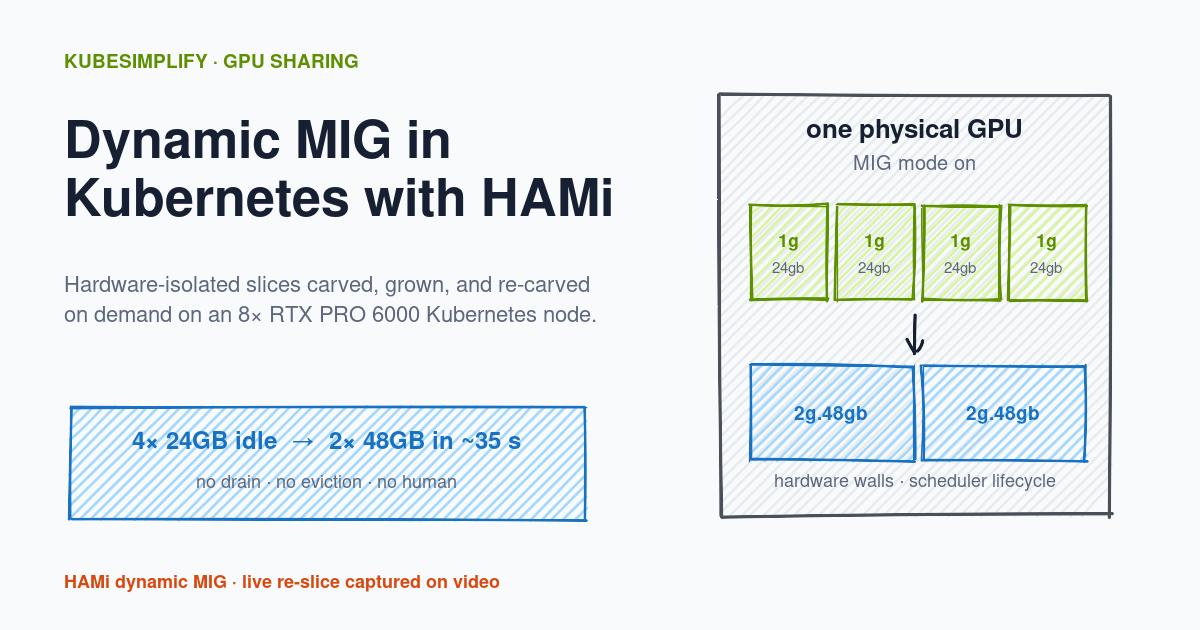
Test 3: Dynamic Resizing & Geometry Re-creation on Demand #
The final proof of dynamic lifecycle management: demonstrating that HAMi tears down old MIG geometries and carves new, larger MIG profiles on the fly when workload requests change—without manual intervention or host reboots.
- Initial State: GPU 4 is populated with four idle
1g.24gbMIG partitions (Device 0,Device 1,Device 2,Device 3). - Workload Change: A deployment (
big-mig-smoke-test) requesting 30GB VRAM (nvidia.com/gpumem: 30000) is scaled to 1 replica (kubectl scale --replicas 1 deploy big-mig-smoke-test), which requires a larger2g.48gbprofile. - Transient Pending & Declarative Reconcile: The pod temporarily enters
0/1 Pendingwhile HAMi checks the GPU. Because none of the four existing 24GB partitions can fit a 30GB ask, HAMi detects that reslicing is required. Since all four 24GB slices on GPU 4 are idle, HAMi callsnvidia-mig-partedto wipe the four 24GB slices and re-carve GPU 4 with2g.48gbslices. - Automated Admission & Placement: Within ~35 seconds,
nvidia-smi -Lconfirms GPU 4 now exposes2g.48gbslices (Device 0,Device 1), andbig-mig-smoke-testtransitions seamlessly to1/1 Running.
The Prerequisite: Zero Occupied Handles #
Crucially, dynamic reslicing only occurs when no active pods or host processes are claiming any MIG instances on that card. If even a single container or host daemon (e.g., DCGM exporter or monitoring tool) holds an active CUDA handle on any partition of the GPU, driver locks prevent nvidia-mig-parted from tearing down the geometry layout. The incoming pod will remain safely in Pending until all processes on that card exit and release their handles.
Why This Matters (The Operational Benefits) #
- Zero-Ops Automation: Platform engineers never need to SSH into nodes at 2 AM to run manual
nvidia-smi migteardown scripts or drain nodes just to re-partition cards for different team requirements. - Adaptive GPU Hardware Utilization: Your GPU fleet automatically adapts to shifting workload demands. A card can run four high-density 24GB micro-inference containers during daytime traffic, and then automatically re-slice into a single 96GB or two 48GB instances overnight for batch LLM fine-tuning as soon as the day's inference pods exit.
- Safe Silicon Boundaries: Guarantees true physical isolation with zero risk of accidental tenant eviction. HAMi respects occupied silicon and will never forcibly terminate a running workload just to re-slice a GPU.
hami-core Mode vs. mig Mode: The Decision, Per Node #
| hami-core node | mig node (dynamic MIG) | |
|---|---|---|
| Isolation | Intercepted driver calls (software) | Silicon partitions (hardware) |
| Slice size | Any MiB / any % | Menu: 24GB, 48GB, 96GB on this card |
gpumem meaning | Enforced quota | Sizing hint, rounds up to a profile |
| Max tenants per card | deviceSplitCount (10 here) | Max instances (4 here) |
| Over-request failure | At runtime (hami-core OOM) | At scheduling (pod pends) |
| Stranded VRAM | None (exact-size grants) | Profile size minus request (16GB on 8GB ask) |
| Hardware support | Any NVIDIA card, plus other vendors | MIG-capable cards only |
| Reconfiguration | Pod spec change | Instance create/destroy, placement permitting |
The architecture this table implies is not choosing one. It is node pools under one scheduler: mig mode pools for adversarial or compliance-bound tenants, hami-core pools for cooperative high-density dev and inference, the same three resource lines in every pod spec, and HAMi routing each pod to a node whose mode matches the workload's isolation needs. Tenants never learn the difference; the platform team decides it per node label.
Common Pitfalls and How to Solve Them #
Pitfall A: Treating gpumem as Enforced on a mig Node #
The same manifest means different things on different nodes. On hami-core nodes the number is a wall; on mig nodes it is a menu lookup. A workload sized for 8GB that quietly grows to 20GB will run fine on its 24GB MIG instance and then OOM the day it lands on a hami-core node. Size requests for what the workload actually uses, not for what the profile happens to give you.
Pitfall B: Expecting hami-core Density From Silicon #
If capacity planning assumed 10 tenants per card, a mig-mode node delivers at most 4 on this hardware, and only if everyone fits in 1g profiles. The density and the isolation are the trade; nothing gives you both on one card.
Pitfall C: Reading the Node's Capacity Like a hami-core Node #
nvidia.com/gpu: 80 meant scheduling slots in post two. On a mig node the advertised capacity follows instance geometry instead. Dashboards and alerts that assume one meaning across the fleet will lie to you.
Conclusion #
- Established what dynamic MIG is: HAMi's scheduler carving real MIG instances on demand from the card's geometry menu, same request API as software slicing, hardware isolation per pod.
- Configured a node pool for
operatingmode: migand proved the request-to-profile rounding with the two-mode nvidia-smi fingerprint. - Proved that over-capacity requests fail at scheduling time rather than runtime.
- Proved dynamic re-carving end to end: a
gpumem: 30000request arrived at a card holding four idle 24GB partitions, and HAMi wiped and re-carved them into2g.48gbslices in about 35 seconds, with no human in the loop and no drain. - Closed the trilogy's decision framework: time-slicing enforces nothing, hami-core enforces in software with exact sizes, static MIG enforces in silicon with fixed menus, and dynamic MIG buys the silicon walls with scheduler-speed lifecycle, per node, under one API.
HAMi is a CNCF Incubating project; the docs live at project-hami.io and the source at github.com/Project-HAMi/HAMi. If you are landing here first, start the trilogy from the beginning with the MIG deep dive, then the HAMi software vGPU guide.
Thanks to our hardware partner
This deep dive ran on an 8x NVIDIA RTX PRO 6000 Blackwell node from Utho Cloud. If you need GPU infrastructure to run workloads like these, take a look.
Explore UthoBuilding Hybrid K8s Platforms @trivago | Tech Author & Speaker (freeCodeCamp, SREDays) | vCluster Ambassador | RHCA & GCP DevOps Professional
Saiyam is working as Head of DevRel at vCluster Labs. He is the founder of Kubesimplify, focusing on simplifying cloud-native & AI infrastructure. He is KubeCon Co-chair and has worked on many facets of Kubernetes, including machine learning platforms, scaling, multi-cloud, & managed Kubernetes services. When not coding, Saiyam contributes to the community by writing blogs and organizing local meetups for Kubernetes and CNCF. He is also a CNCF TAG OpsRes Chair & can be reached on Twitter @saiyampathak.
Get new posts in your inbox.
Spotted a typo or want to improve this post? Edit on GitHub →